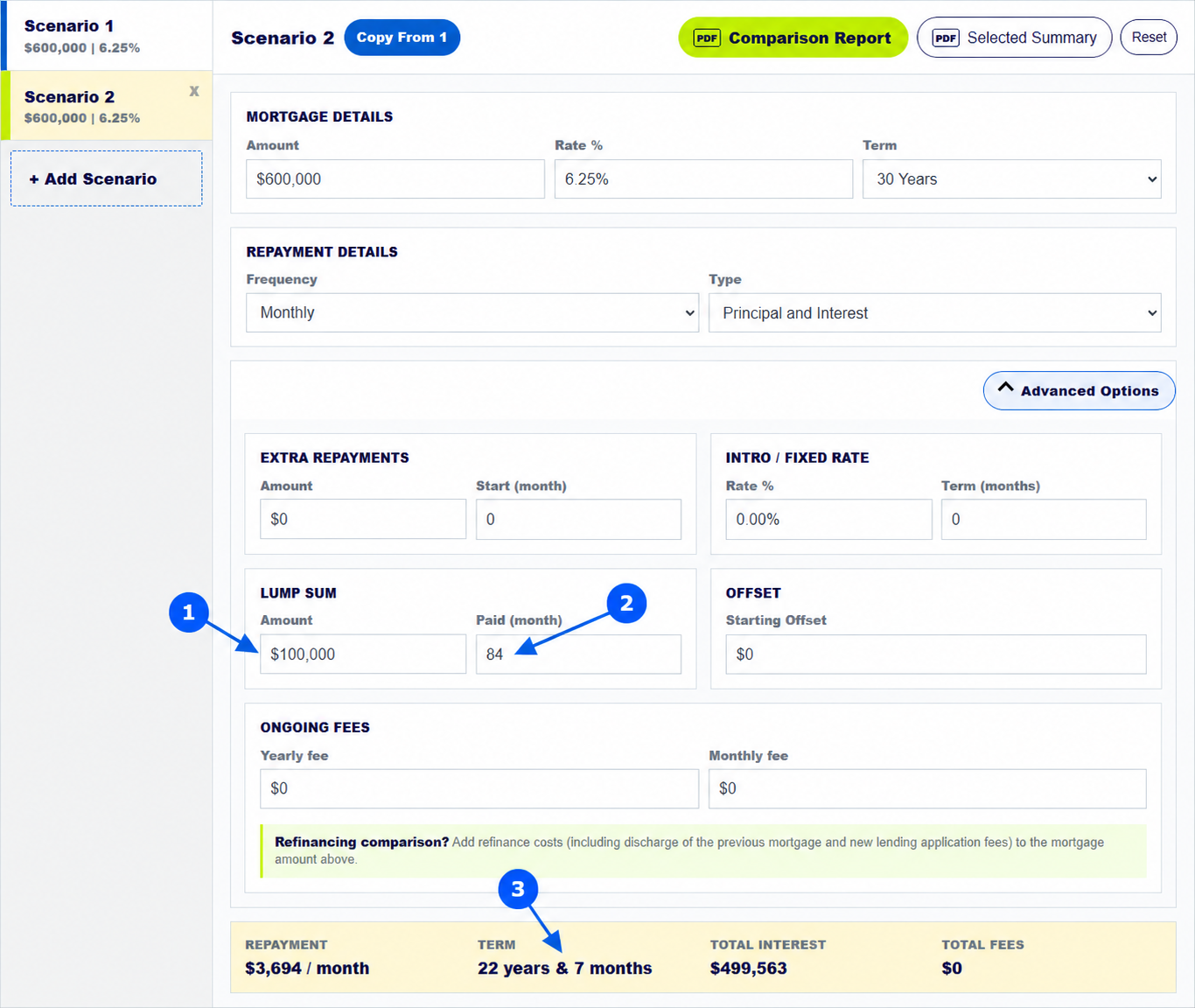
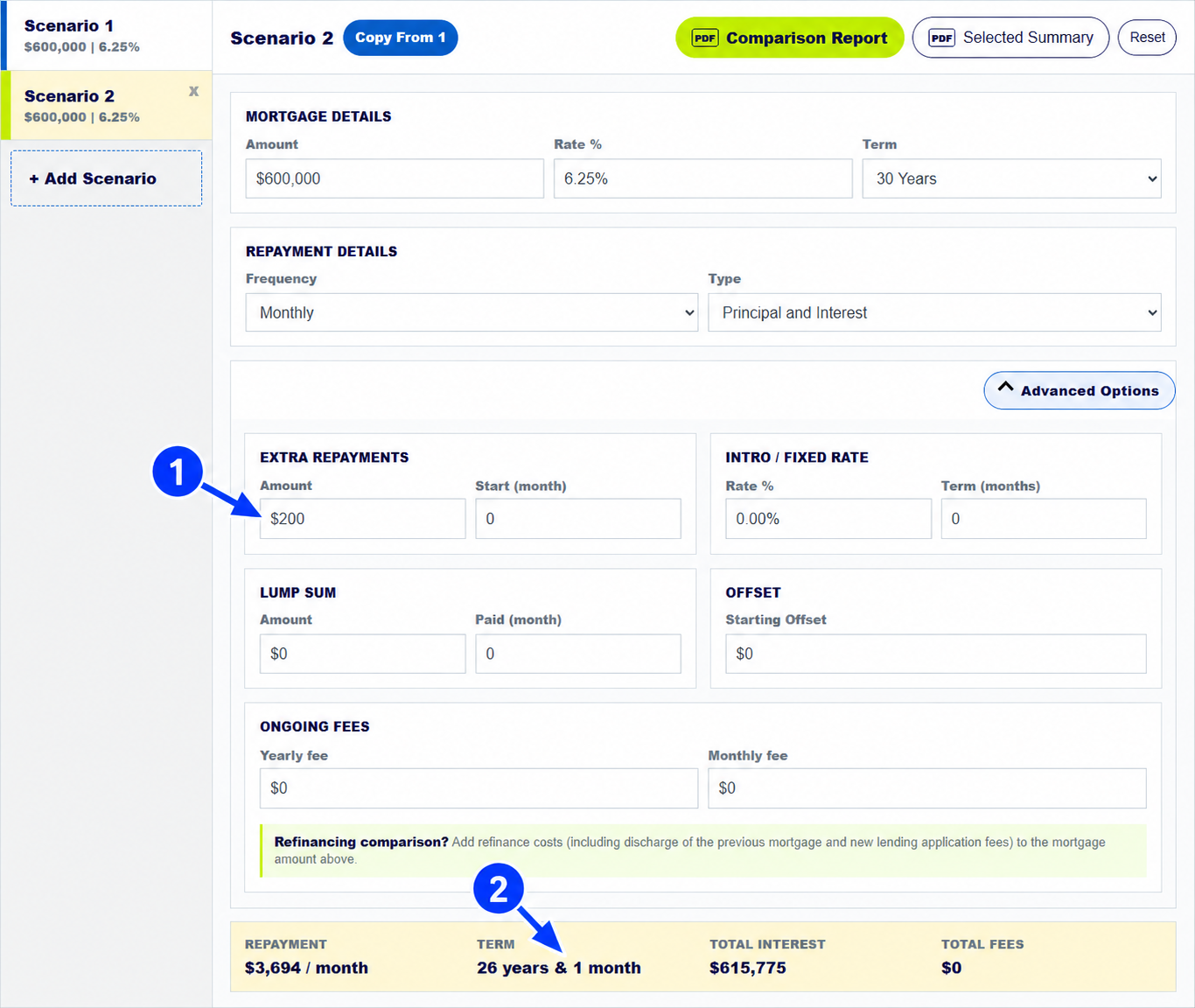
To test an extra mortgage repayment, copy your current loan into a second scenario, open Advanced Options, and enter the extra amount and start month. The calculator then updates the estimated term, interest and balance graph. In the example shown above, an extra $200 each month shortens a modelled 30-year loan to 26 years and 1 month.
The numbered arrows on the real calculator screenshot above show the controls used in this example. Open the calculator to enter your own figures.
How do you enter extra repayments in the mortgage calculator?
Enter the loan amount, interest rate, term and repayment frequency in Scenario 1. Select Add Scenario, then Copy From 1. Open Advanced Options in Scenario 2. Put the amount you plan to pay on top of the normal instalment in Extra Repayments: Amount, and the starting month in Start (month). Month 0 means the extra amount begins at the start of this model.
Use the same frequency as the scenario. A $200 extra amount in a monthly scenario is $200 each month; a $200 amount in a fortnightly scenario is paid each fortnight.
What happens if you pay an extra $200 a month on a mortgage?
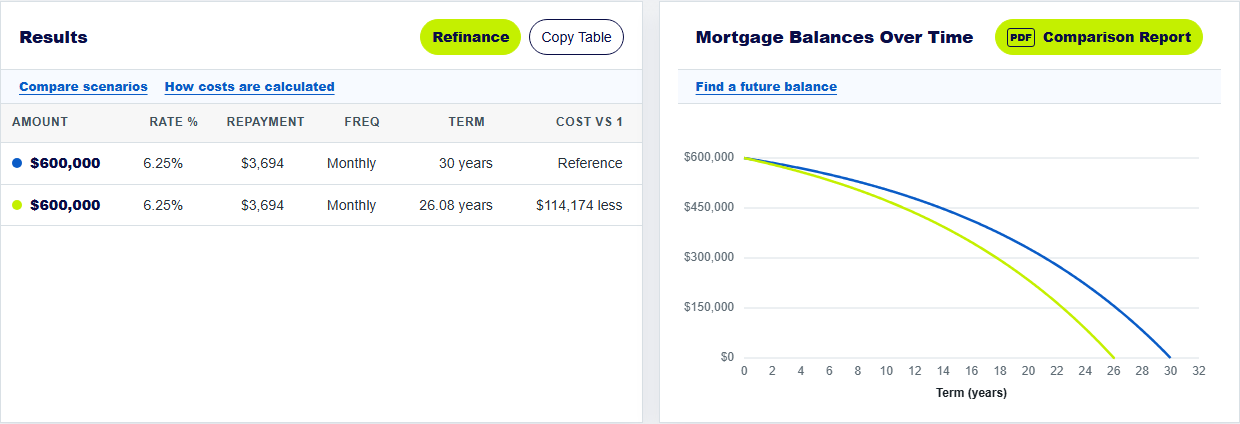
Our example keeps Scenario 1 at $600,000, 6.25% and 30 years with monthly principal-and-interest payments. Scenario 2 adds $200 a month from the start. The calculator shows the same scheduled repayment of about $3,694 a month, plus the $200 extra. The projected term becomes 26 years and 1 month, and total interest falls from about $729,949 to $615,775, an estimated $114,174 difference.
The result is an illustration, not a prediction of future rates. Test your actual balance, rate and start date for a useful comparison.
How do you read interest savings and the repayment graph?
The Cost vs 1 column compares each scenario's modelled interest plus ongoing fees with Scenario 1. The balance graph shows when one line falls faster than another; a faster fall means less principal remains at that time. Check the Payment Summary as well. Its Additional column records the extra amount period by period, while End Balance shows the balance after that payment.
Read the term and total interest together. A lower balance now can reduce later interest, which is why the projected payoff can move forward even when the scheduled payment does not change.
How do you check extra-repayment limits and fees?
Before you rely on the estimate, check your lender's extra-payment rules. Some fixed-rate loans limit additional payments or charge fees. Ask whether the lender keeps the scheduled repayment unchanged or recalculates it after a large payment. MoneySmart suggests checking whether you can make extra repayments without a fee when comparing home loans.
If you want to test a one-off amount rather than a recurring payment, use the separate Lump Sum fields. The lump-sum guide shows that workflow.
Keep exploring: payoff-time guide, lump-sum guide. For home-loan product conditions, see MoneySmart on extra-repayment conditions.
Test extra mortgage repayments
Change the amount and start month to see how your own loan estimate moves.
How does the mortgage calculator model extra repayments?
How do I add recurring extra repayments in the mortgage repayment calculator?
Open Advanced Options and enter the Extra Repayments amount and Start (month). The extra amount repeats at the scenario's payment frequency.
How does the home loan calculator show savings from $200 extra a month?
Compare the projected term, total interest and balance graph with Scenario 1. Savings depend on your loan balance, rate, term and when extra payments begin.
Does this extra repayment calculator reduce my normal payment?
No. It keeps the scheduled repayment and applies the extra amount to the balance. Ask your lender whether it would change the required payment.
About this example: The example uses a $600,000 principal-and-interest loan at 6.25% over 30 years with monthly payments, no fees and no offset. Scenario 2 adds $200 per month from month 0. Screenshots were captured from this calculator on 30 September 2026. Numbered arrows highlight important parts of the featured image. Results are estimates, not a lender quote or personal financial advice. Read the calculator assumptions.