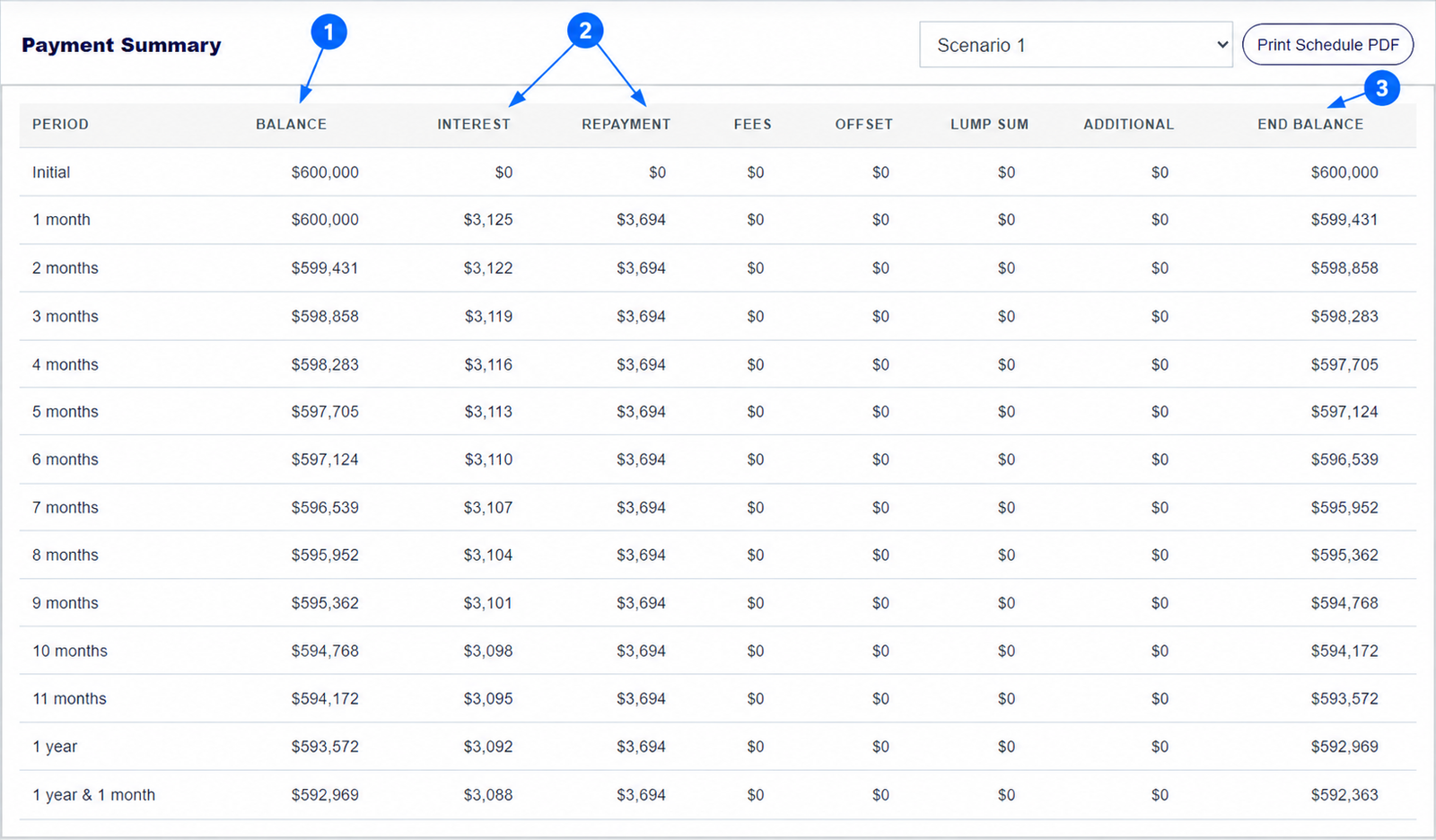
To find out how long your home loan could take to repay, enter your amount, rate, term and payment frequency in the mortgage repayment calculator. Read the Term result. Then copy the loan into another scenario and change one repayment setting to see whether the estimated time gets shorter. This guide shows the steps with a real $600,000 example.
The numbered arrows on the real calculator screenshot above show the controls used in this example. Open the calculator to enter your own figures.
How do you find the estimated payoff time of a home loan?
Enter the amount still owed if you are checking an existing loan, or the amount you expect to borrow for a new one. Add the interest rate, remaining loan term, repayment frequency and loan type. The Term box below the inputs shows the calculator's estimated repayment time. It is a duration, such as 30 years, rather than a promised calendar payoff date.
Start with figures from your loan statement or offer. A longer term can make the scheduled payment smaller while increasing total interest. The full repayment schedule guide explains how to see the balance falling month by month.
How can an extra $200 a month shorten a home loan?
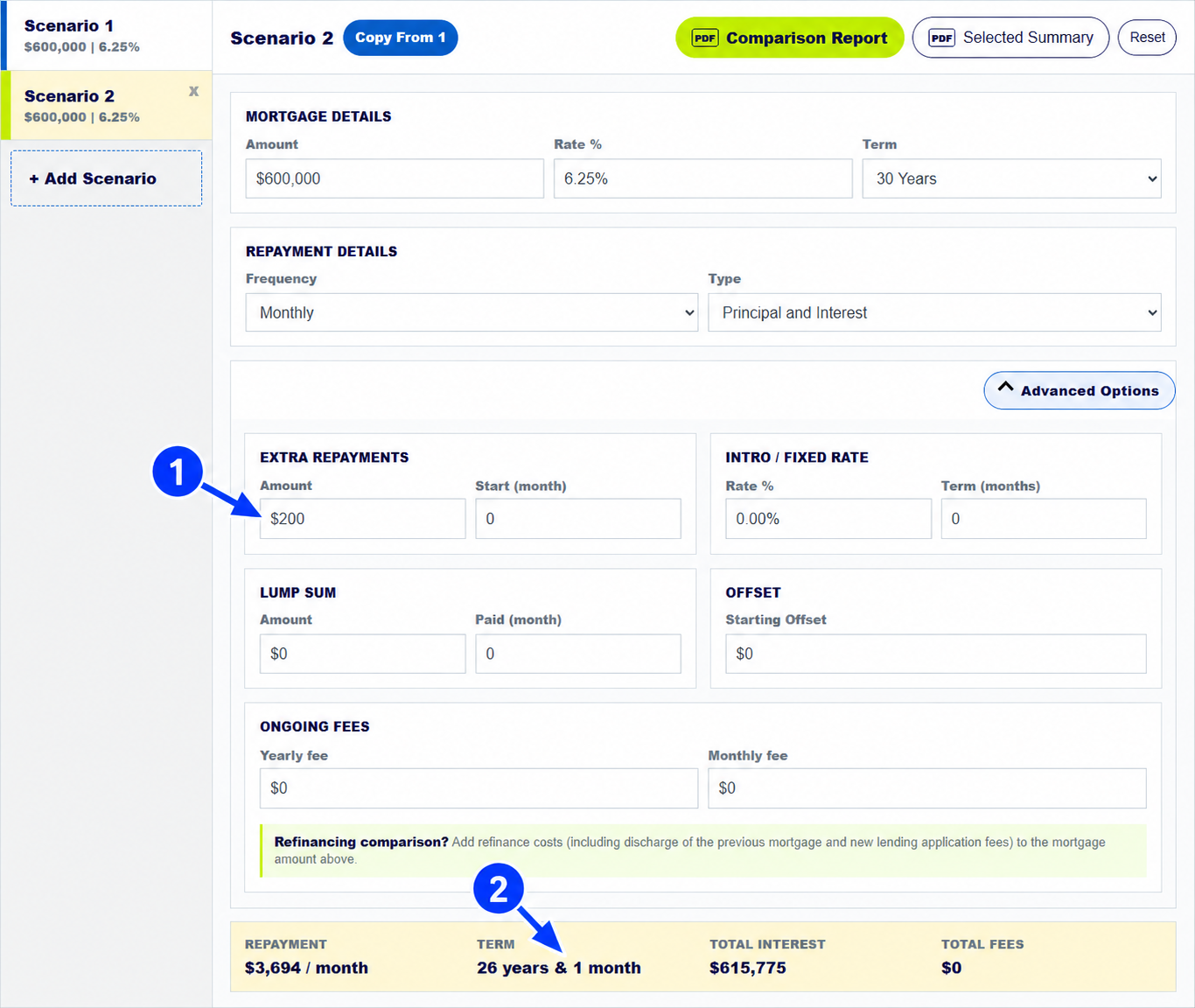
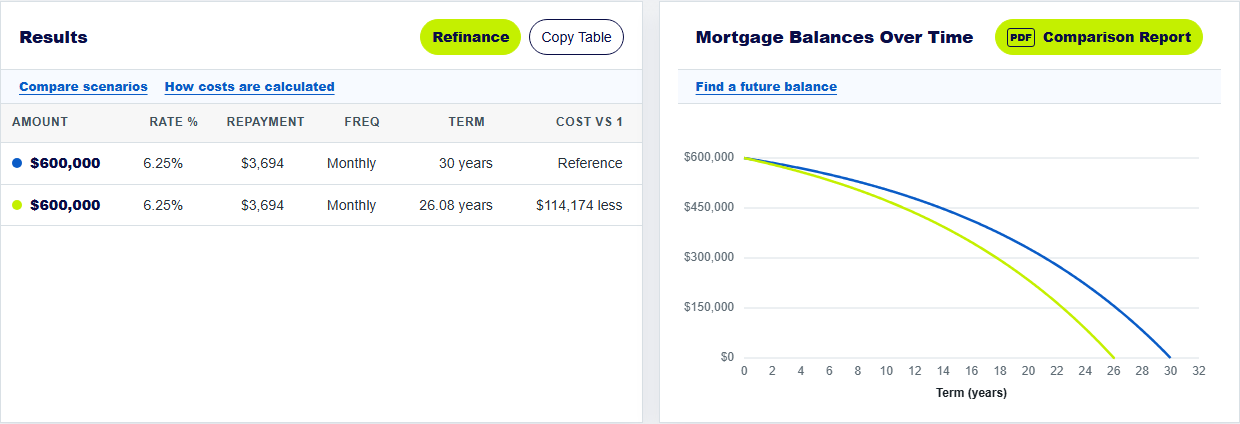
Copy Scenario 1 into Scenario 2, open Advanced Options, and enter $200 in Extra Repayments from month 0. With a $600,000 loan at 6.25% over 30 years, the calculator shows an estimated term of 26 years and 1 month instead of 30 years. It shows $114,174 less total interest in this example.
The regular scheduled repayment remains about $3,694 a month; the $200 is extra. If you start the extra payment later, use its actual start month. The result will differ because the loan has less time to benefit from it.
How do a lump sum and an offset change the payoff time?
A lump sum reduces the loan balance when it is paid. In the tool, enter its amount and the month paid. An offset is different: money stays in a linked account and reduces the balance used to calculate interest, subject to the lender's rules. Both may shorten the calculator's projected term if the scheduled repayment stays the same.
Test each change in its own scenario. This shows which input caused the difference and avoids treating an offset balance as if it were a repayment. Read the separate lump-sum guide and offset guide for step-by-step examples.
How do you check whether an early payoff estimate is realistic?
Check whether your loan allows the extra payments you entered, particularly during a fixed-rate period. Ask the lender whether a lump sum changes the required scheduled payment or simply shortens the term. Also check for fees, rate changes and redraw conditions. A calculator can compare strategies, but it cannot enforce a lender's product rules.
MoneySmart's home-loan guide recommends checking extra-repayment fees, loan features and what happens when a fixed or introductory rate ends.
Keep exploring: extra repayments guide, repayment schedule guide. For home-loan product conditions, see MoneySmart's guide to choosing a home loan.
Check your home loan payoff time
Use your own balance, rate and repayment plan to compare projected terms.
How does a home loan calculator estimate payoff time?
How does the mortgage repayment calculator estimate my home loan payoff time?
It starts with your loan amount, rate, term and payment frequency. Extra repayments, a lump sum or a starting offset may shorten the projected term.
Can the home loan calculator give me an exact payoff date?
No. It shows an estimated term and repayment schedule, not a guaranteed calendar date. Actual rates, payment dates and lender calculations may differ.
Will the calculator lower my monthly payment if I pay extra?
No. The scheduled repayment stays the same in this model. Extra payments reduce the balance and may shorten the term. Ask your lender how it would treat them.
About this example: The worked example is a $600,000 principal-and-interest loan at 6.25% for 30 years, paid monthly, with no fees or offset. Scenario 2 adds $200 every month from the start. Screenshots were captured from this calculator on 30 September 2026. Numbered arrows highlight important parts of the featured image. Results are estimates, not a lender quote or personal financial advice. Read the calculator assumptions.