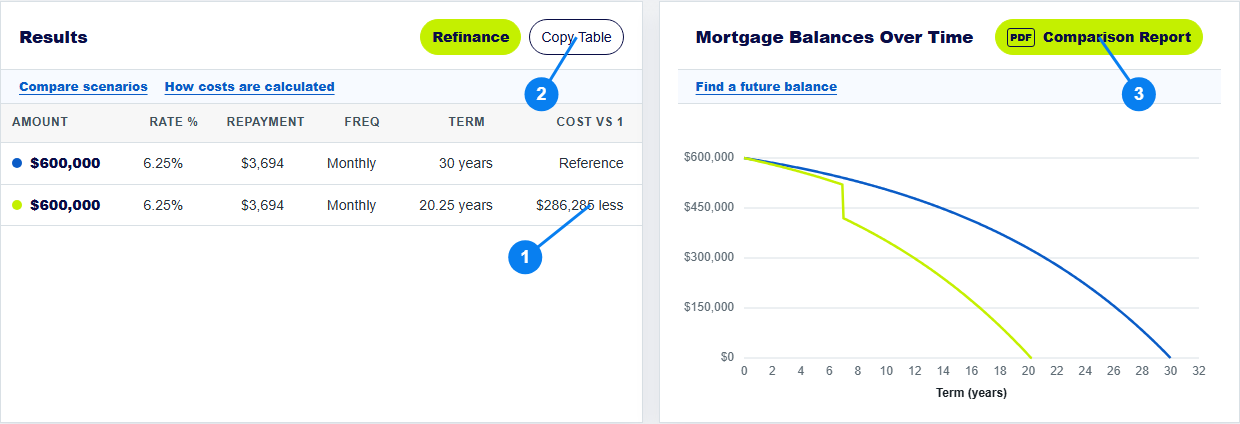
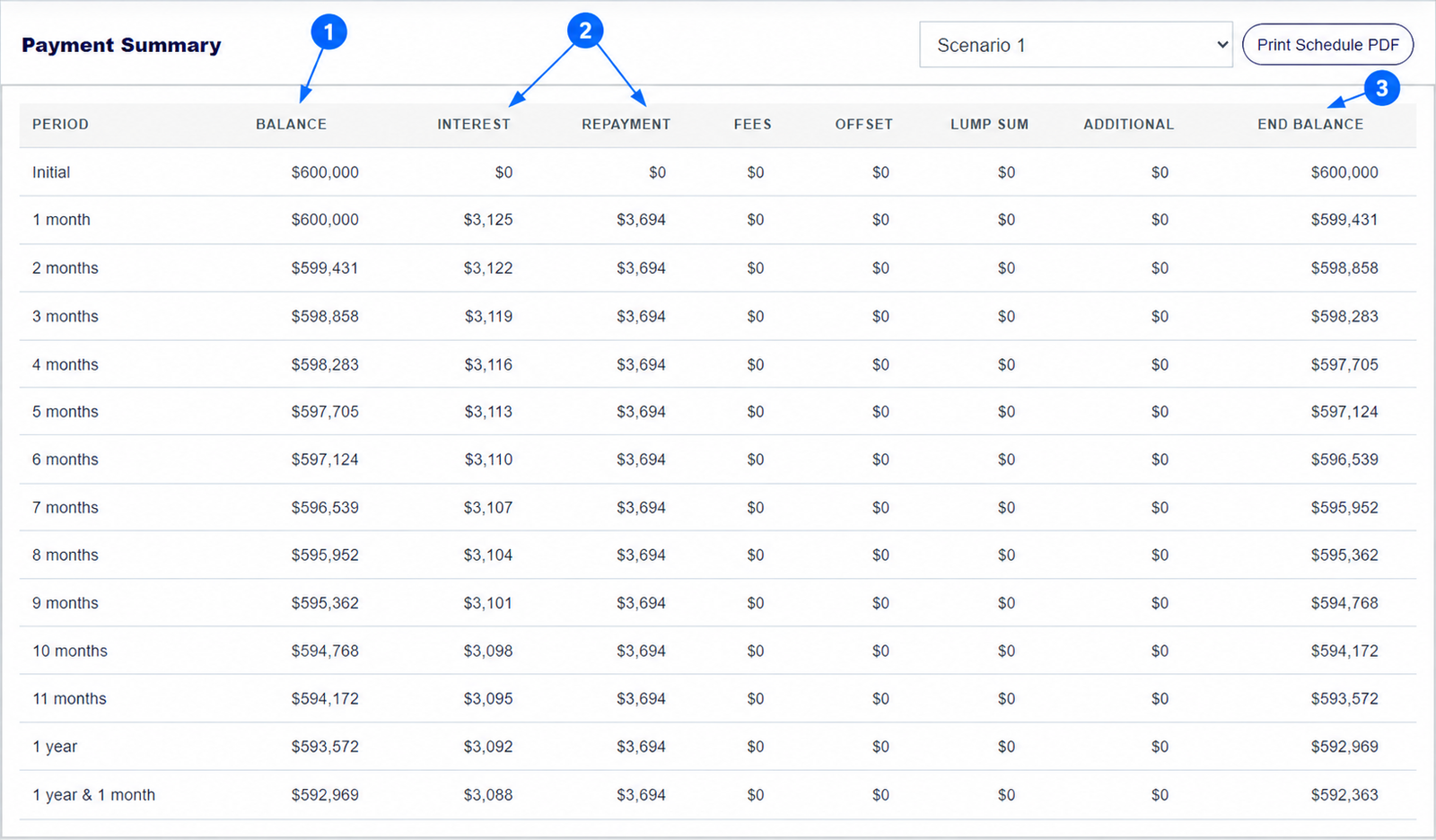
A full home loan repayment schedule shows what happens in each payment period. In the calculator's Payment Summary, read across a row from the opening Balance through Interest, Repayment and any extra amounts to the End Balance. The next row starts from that ending balance. The arrows in the screenshot point to the most useful columns.
The numbered arrows on the real calculator screenshot above show the controls used in this example. Open the calculator to enter your own figures.
How do you find the full mortgage repayment schedule?
Enter your loan details, then scroll below the results table and balance graph to Payment Summary. The schedule is generated for the selected scenario. If you have more than one scenario, use the selector beside the heading to choose the one you want. The visible box scrolls through every payment period; the example 30-year monthly loan has an initial row and 360 monthly rows.
Use the frequency that matches your lender quote. Monthly, weekly and fortnightly scenarios produce different periods, so the row labels will change.
How do you read balance, interest and principal in a repayment row?
Balance is what remains at the start of the period. Interest is the interest modelled for that period. Repayment is the scheduled payment. The amount left after interest and relevant fees is what reduces principal; extra payments and lump sums can reduce it further. End Balance is the amount carried into the next row.
In the first month of the $600,000, 6.25% example, the schedule shows $3,125 interest, a $3,694 scheduled repayment and an end balance of about $599,431. The difference between rounded displayed figures may be a dollar because the underlying calculation keeps more precision.
How do you read fees, offset, lump sum and additional repayments?
Fees records ongoing yearly and monthly costs allocated to the payment period. Offset shows the offset amount used in the interest model. Lump Sum shows a one-off payment when it occurs. Additional shows a recurring extra repayment. Keep these columns in view when an ending balance differs sharply from the baseline.
An offset is not itself a loan repayment, so do not add it to principal paid. The offset guide explains that distinction with a separate example.
How do you find the loan balance at a future year?
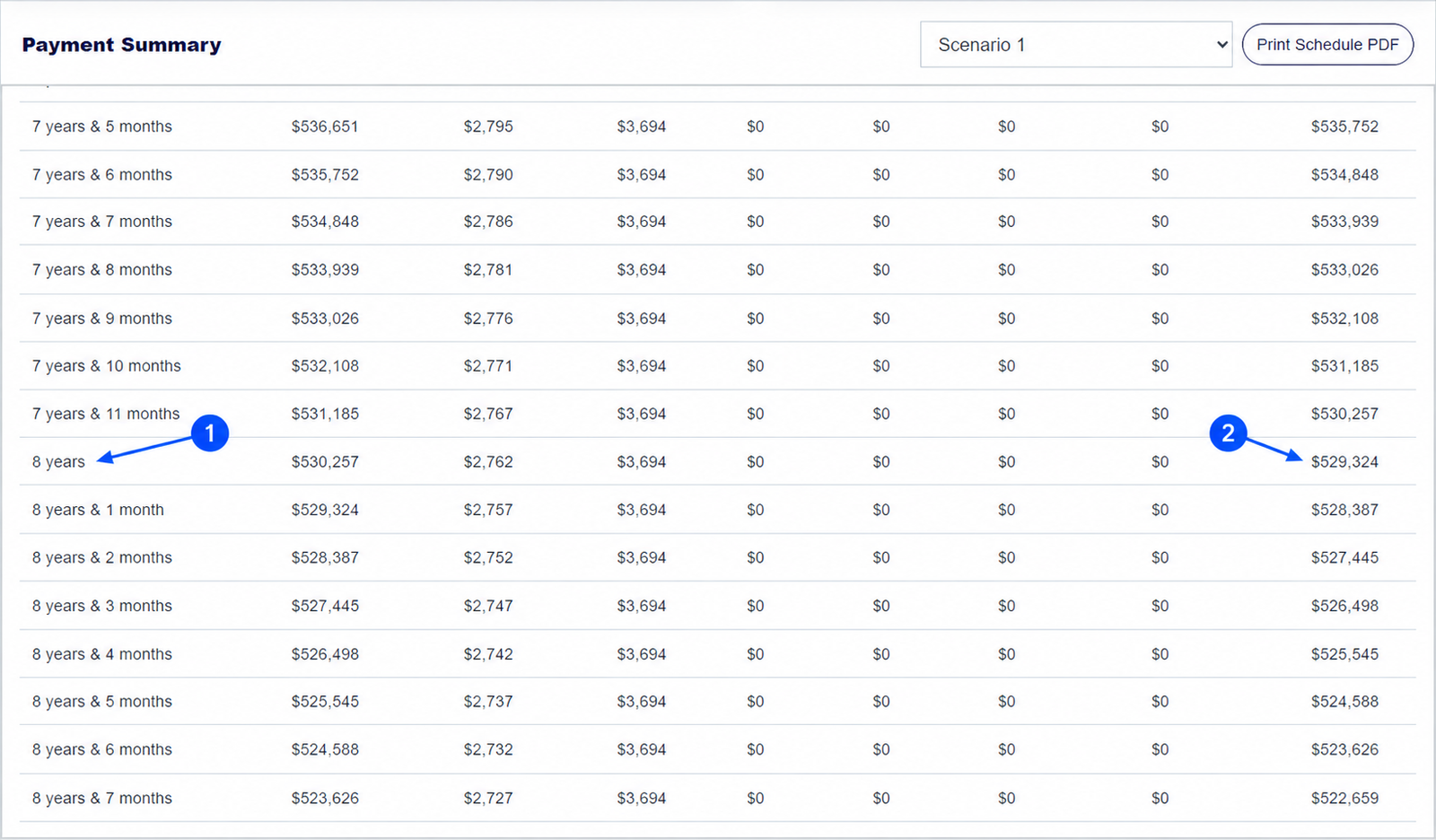
Scroll to the row labelled with the future point you need, such as 8 years. Read its End Balance if you mean the balance after that period's scheduled payment. Read the opening Balance if you mean just before that payment. In the baseline example, the eight-year row shows $530,257 at the start of the period and $529,324 at the end.
If you are comparing several scenarios, select each one and note the same labelled period. The eight-year balance guide shows exactly how.
Keep exploring: eight-year balance guide, PDF report guide. For home-loan product conditions, see MoneySmart's explanation of loan repayments.
Read your mortgage schedule
Enter your figures, choose a scenario and inspect any payment period.
How do you read the home loan calculator repayment schedule?
Is the home loan calculator's repayment schedule a lender statement?
No. It is an estimate based on your inputs. A lender may use different interest timing, payment dates, rounding or product rules.
Which column in the mortgage calculator shows my balance after a payment?
Use End Balance for the amount after that period's payment. Balance is the amount at the start of the period.
Can I print the full schedule from this mortgage calculator?
Yes. In Payment Summary, select Print Schedule PDF, then use your browser's print or Save as PDF option.
About this example: The example is a $600,000, 6.25%, 30-year principal-and-interest loan with monthly payments and no fees or offset. Figures shown in the table are rounded for display. Screenshots were captured from this calculator on 30 September 2026. Numbered arrows highlight important parts of the featured image. Results are estimates, not a lender quote or personal financial advice. Read the calculator assumptions.