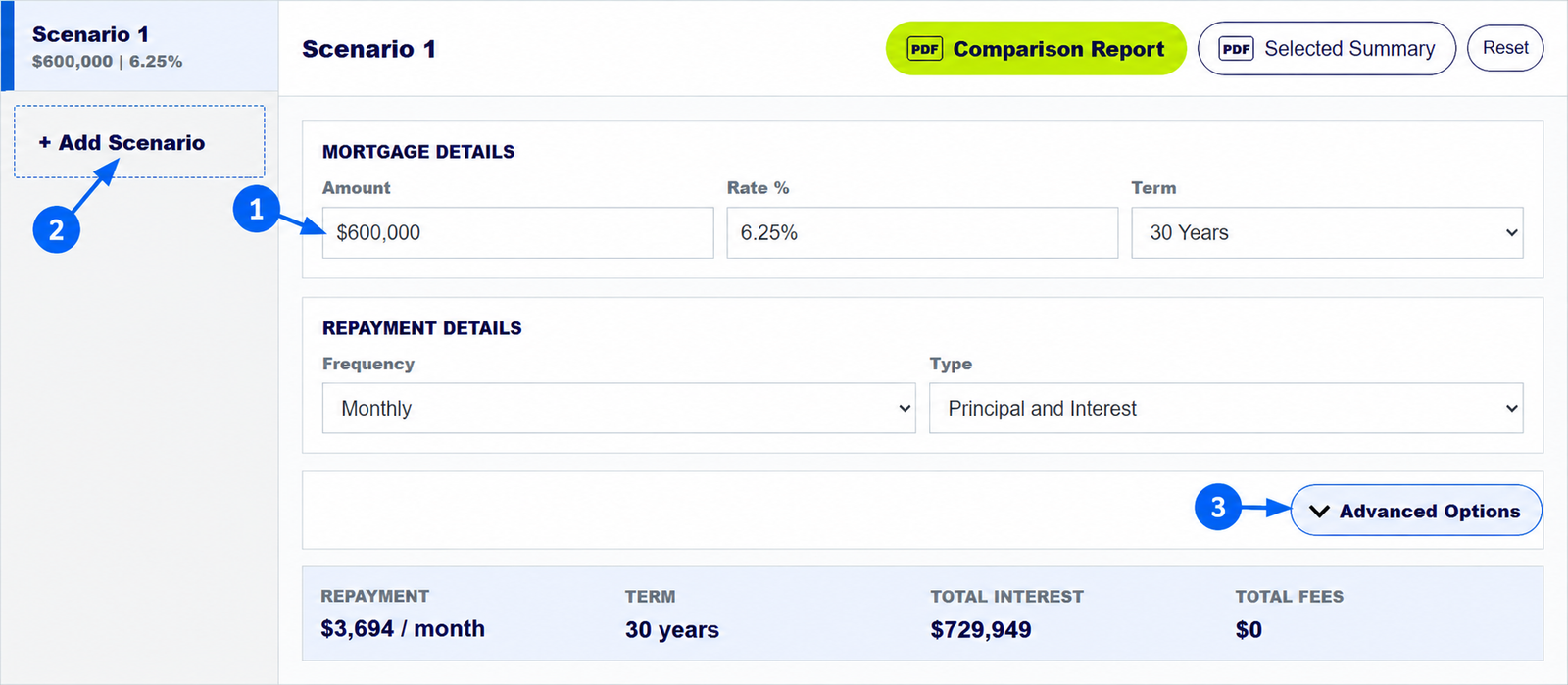
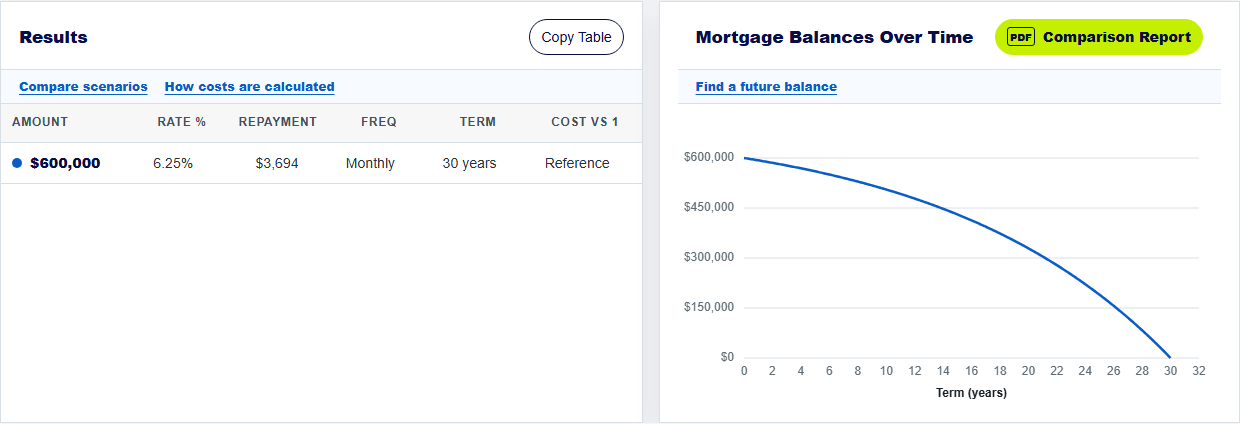
To calculate a monthly mortgage repayment, enter the amount you will borrow, the annual interest rate and the loan term, then choose Monthly and the repayment type. The calculator shows the estimated regular payment immediately. For its illustrative $600,000 loan at 6.25% over 30 years, the principal-and-interest estimate is about $3,694 a month.
The numbered arrows on the real calculator screenshot above show the controls used in this example. Open the calculator to enter your own figures.
How do you calculate a monthly home loan repayment?
Start with the amount borrowed, not the property's full purchase price if you are paying a deposit. Enter the annual interest rate from the loan offer and the number of years you plan to repay the loan. Choose Monthly under Frequency and Principal and Interest if you want each payment to reduce the balance. The calculator combines the loan amount, rate and term to estimate a regular payment that repays the modelled loan over that time.
For an existing mortgage, use your current balance and remaining term rather than the original loan amount and original 30-year term.
How much is a $600,000 mortgage per month at 6.25%?
With a 30-year term and monthly principal-and-interest payments, this calculator shows about $3,694 per month. It estimates about $729,949 in total interest across the modelled term with no fees, offset or extra payments. This is an example of the tool's calculation, not a current lender offer or a rate recommendation.
The first month's schedule shows why the balance falls slowly at first: about $3,125 of that payment is modelled interest, leaving the rest to reduce principal. Later payments contain less interest as the balance falls.
How do the rate and loan term change a mortgage repayment?
Holding the amount and term steady, a higher interest rate generally raises the payment and total interest. A longer term generally lowers each scheduled payment but leaves interest running for more years. Copy a baseline into Scenario 2 and change only one field to see its effect clearly.
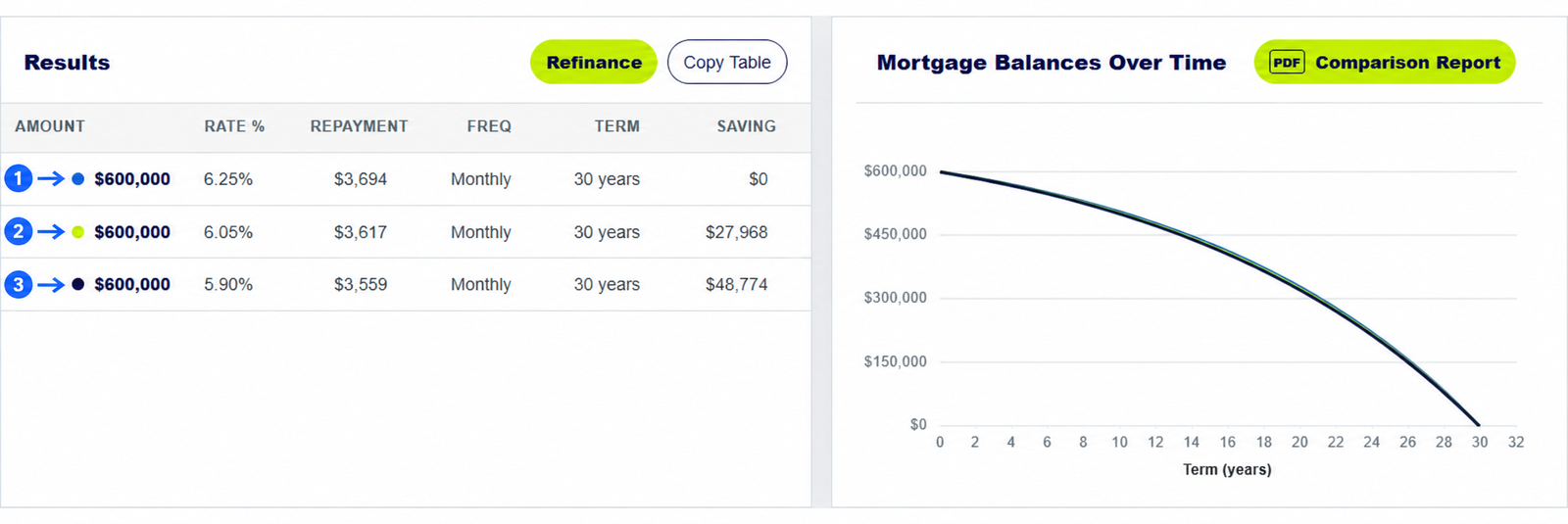
For example, the three-rate comparison guide keeps the amount and term the same while testing 6.25%, 6.05% and 5.90%. The monthly estimates differ even though all three are 30-year loans.
How is an interest-only repayment different from principal and interest?
With principal and interest, part of each payment reduces the amount owed. With interest only, the scheduled payment for the interest-only period does not reduce principal in the same way. That can make the initial payment look lower while leaving the loan balance higher. Choose the Type that matches the offer and compare the full schedule, not only the first payment.
MoneySmart warns that repayments can rise after an interest-only period ends. Ask the lender for the full terms of the product.
Keep exploring: visual calculator walkthrough, three-rate comparison guide. For home-loan product conditions, see MoneySmart on interest-only home loans.
Calculate monthly mortgage repayments
Use your loan balance, rate and term to see a repayment estimate.
How does the mortgage repayment calculator estimate monthly payments?
Should I enter the home price or loan amount in the mortgage calculator?
Enter the amount you will borrow. The home price also includes any deposit you pay from your own funds.
Where do I add lender fees in the home loan calculator?
Enter known yearly and monthly ongoing fees in Advanced Options. Check other lender costs separately.
Why might my lender's repayment differ from this mortgage calculator?
Lenders may use different interest timing, payment dates, rounding and product rules. A variable rate can also change.
About this example: The worked estimate is a $600,000 principal-and-interest loan at 6.25% over 30 years with monthly payments, no fees, no offset and no extra payments. Screenshots were captured from this calculator on 30 September 2026. Numbered arrows highlight important parts of the featured image. Results are estimates, not a lender quote or personal financial advice. Read the calculator assumptions.