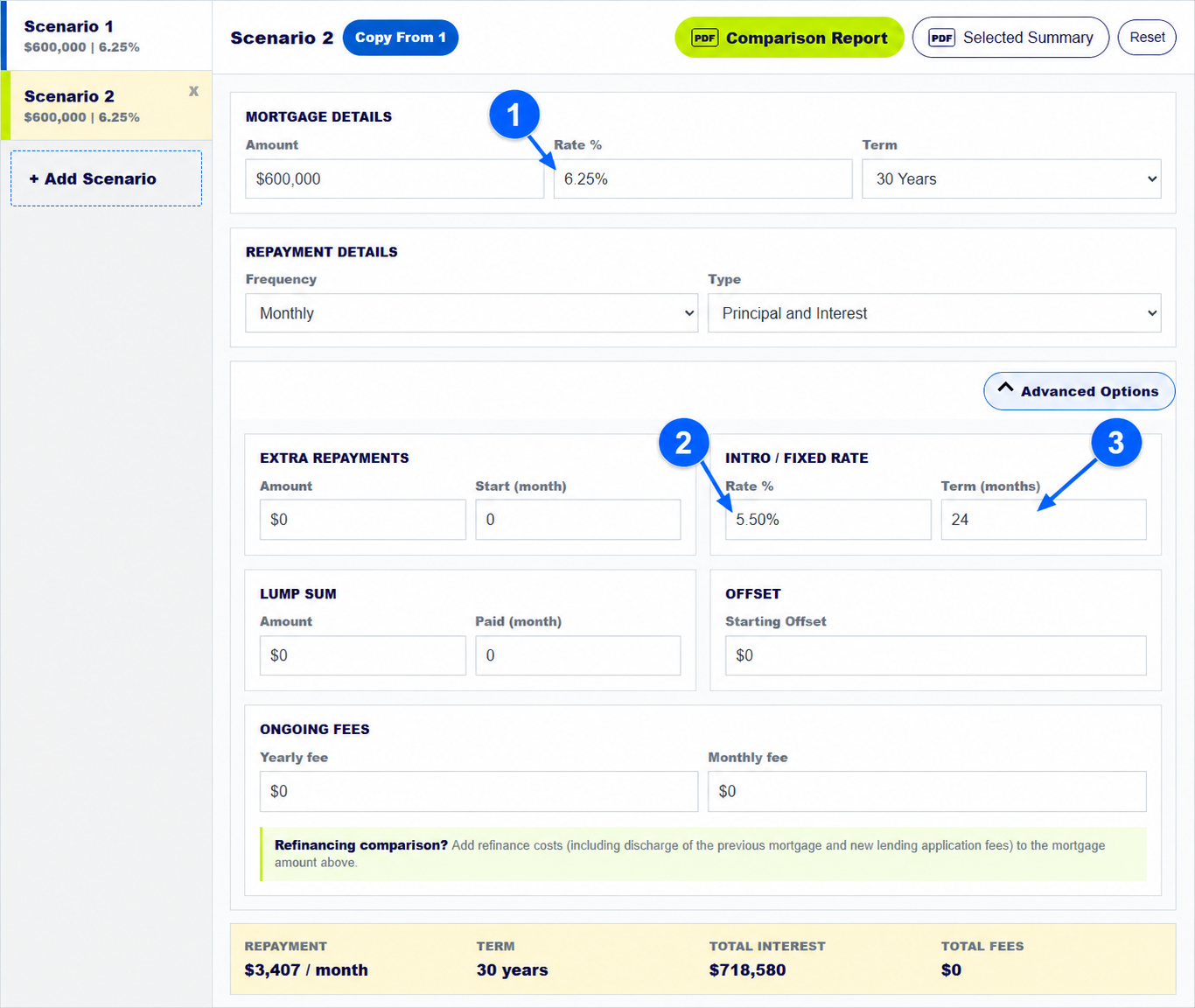
To compare a temporary low mortgage rate with its later rate, enter the ongoing rate in Rate %. Under Intro / Fixed Rate, enter the temporary rate and the number of months it lasts. Then read the schedule both during and after that period. The first payment can look attractive even though the later payment is higher.
The numbered arrows on the real calculator screenshot above show the controls used in this example. Open the calculator to enter your own figures.
How do you enter an introductory rate and ongoing rate?
Put the loan amount, term, frequency and ongoing annual rate in Scenario 1. Copy it to Scenario 2. In Scenario 2, keep Rate % as the rate that applies after the offer. Open Advanced Options and enter the temporary rate and Term (months). The screenshot models 5.50% for 24 months followed by 6.25% on a $600,000 loan.
Use the rates and dates in the actual lender offer. A different ongoing rate or term can change the conclusion.
How do you find the repayment after a low introductory rate ends?
Check Payment Summary around the end of the temporary period. In this model, Scenario 2 shows about $3,407 a month during the first 24 months. The schedule then shows about $3,681 at month 25 when the 6.25% ongoing rate applies. The first figure should not be treated as the payment for the whole loan.
MoneySmart advises checking what happens when a fixed or introductory rate ends, including whether you can afford the later repayment.
How do you compare total cost instead of only the first repayment?
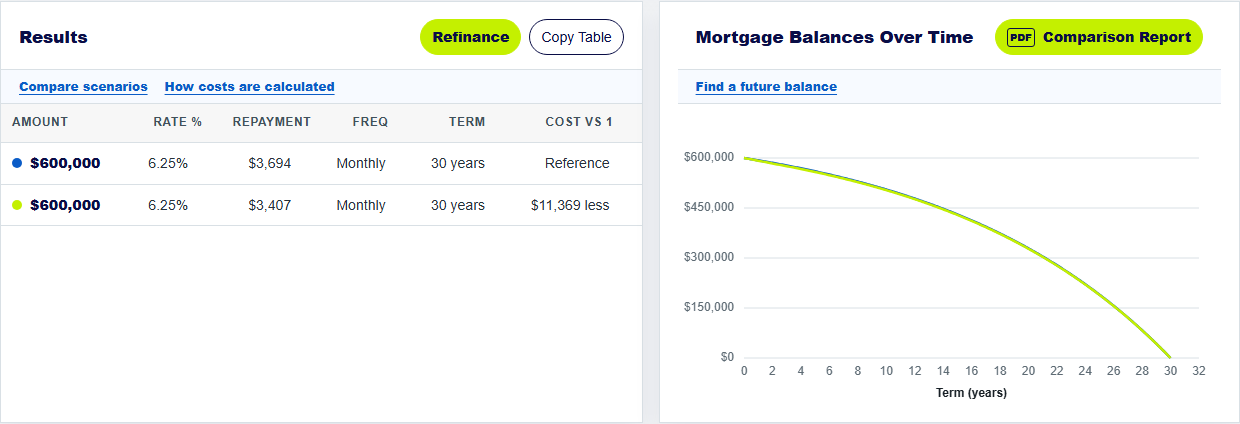
Read total interest and any ongoing fees for both scenarios. With the modelled 24-month intro rate and no fees, the calculator shows about $718,580 in total interest for Scenario 2, compared with about $729,949 for the constant 6.25% baseline. The Cost vs 1 column shows about $11,369 less. That is much smaller than a quick comparison of the first monthly payments might suggest.
Add yearly or monthly fees if the introductory product charges them. A low starting rate can lose its advantage when fees or a higher later rate apply.
How do you check whether a cheap initial rate suits your budget?
Ask for the exact rate after the introductory period, when it begins and whether any conditions can change it. Compare the higher later payment with what you can comfortably afford. Also check limits on extra payments, offset access and costs if you refinance or leave a fixed-rate product early.
The refinance guide shows how to add ongoing fees and assess a proposed switch. Keep rate assumptions current because no calculator can know future variable-rate changes.
Keep exploring: refinance comparison guide, home loan comparison guide. For home-loan product conditions, see MoneySmart on introductory and fixed-rate conditions.
Check the ongoing home loan rate
Enter both rates and the offer length, then read the payment after the offer ends.
How does the mortgage calculator compare introductory rates?
Where do I enter the ongoing rate in this home loan calculator?
Enter it in the main Rate % field. Put the temporary rate and its duration under Intro / Fixed Rate.
Can the mortgage calculator show repayments after an introductory rate ends?
Yes. Read the schedule after the temporary period. In the example, the modelled payment rises from about $3,407 to $3,681 after month 24.
Does the comparison calculator prove a low introductory rate is cheapest?
No. Compare the ongoing rate, total interest, fees, term and product conditions, not just the first payment.
About this example: The example uses a $600,000 principal-and-interest loan over 30 years with monthly payments, 5.50% for 24 months and 6.25% afterward. The baseline is 6.25% throughout; both have no modelled fees. Screenshots were captured from this calculator on 30 September 2026. Numbered arrows highlight important parts of the featured image. Results are estimates, not a lender quote or personal financial advice. Read the calculator assumptions.