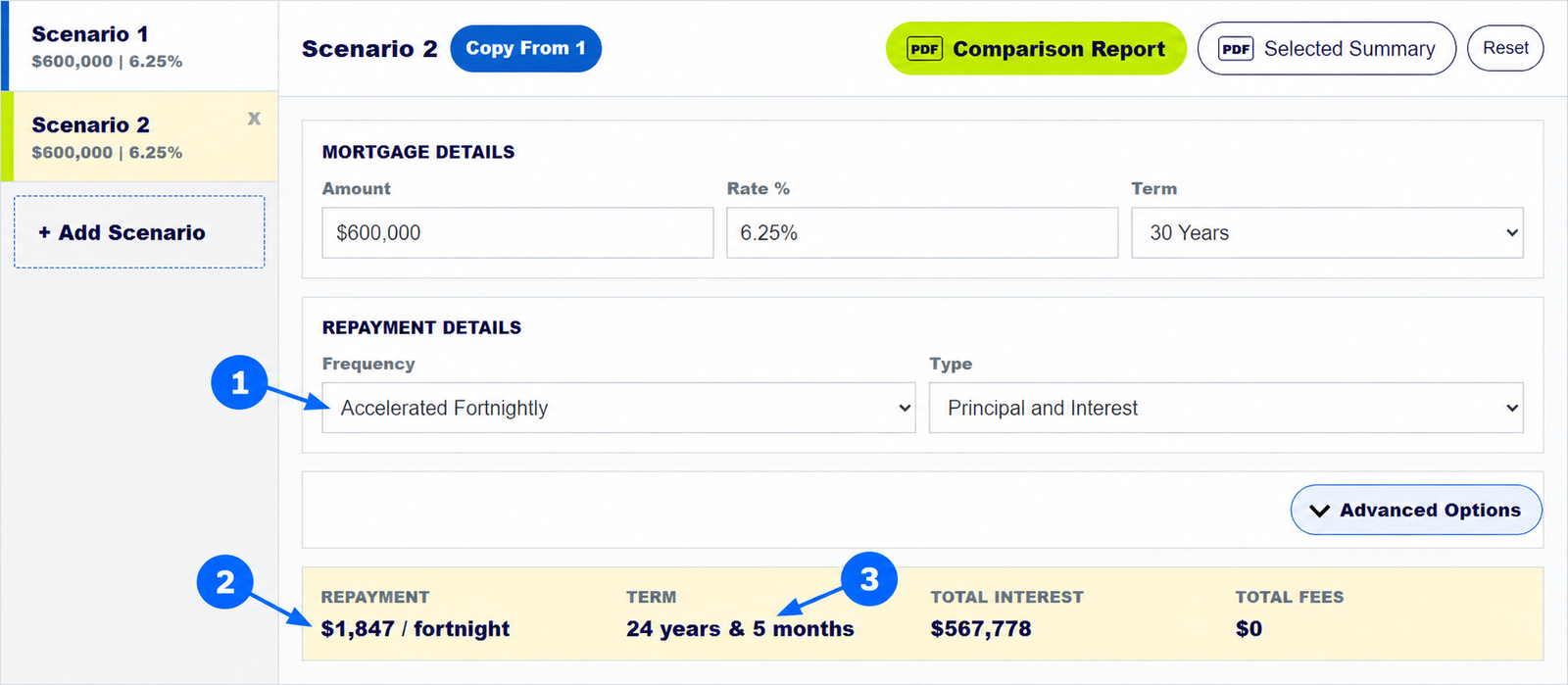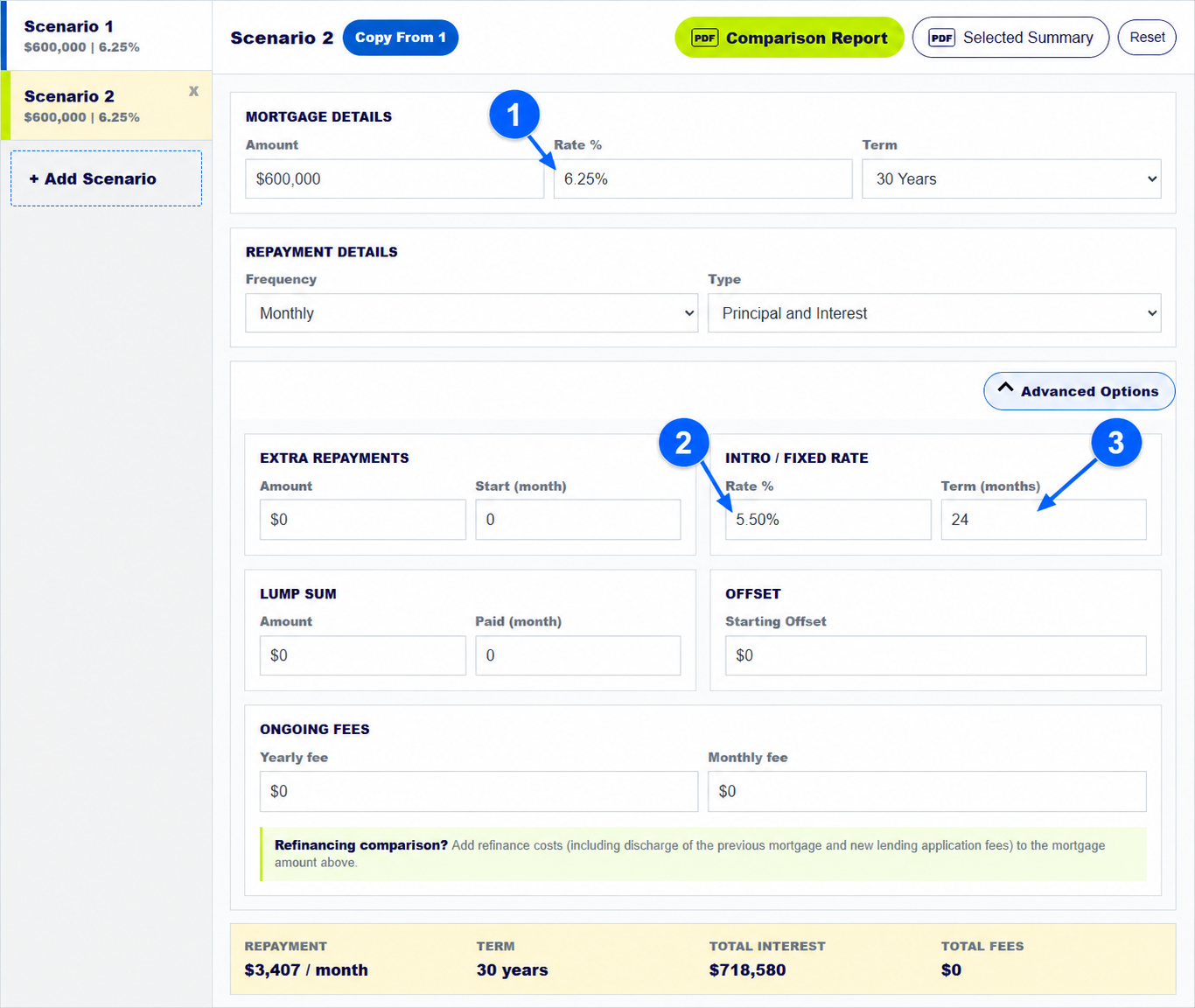
There is no single best mortgage repayment calculator for every Australian borrower. MoneySmart is a strong place for independent government guidance, bank calculators are useful when you want that lender's product rates or a Key Facts Sheet, and a comprehensive mortgage repayment calculator is more useful when you need to model several structures, fees, offsets, extra repayments, lump sums and reports together.
This guide compares five widely used mortgage and home loan repayment calculators in Australia: MoneySmart, CommBank, NAB, ANZ and Westpac. We also show how each one differs from the free multi-scenario calculator on this website.
Which mortgage repayment calculator is best in Australia?
Independent mortgage calculator
MoneySmart suits users who want a government source, transparent assumptions and general home loan education.
Lender home loan calculators
CommBank, NAB and ANZ are useful when you want product-linked rates, application pathways or a lender Key Facts Sheet.
Multi-scenario mortgage calculator
LoanCalculator.Mortgage suits side-by-side comparisons involving up to nine scenarios, fees, offsets, lump sums, schedules and PDF reports.

Our review verdict
Best for comprehensive multi-scenario mortgage modellingLoanCalculator.Mortgage is our top pick when you need up to nine scenarios, flexible fees, an offset, recurring extra repayments, a dated lump sum, full schedules, copyable tables and PDF reports in one workflow.
Westpac sits between the second and third use cases: its repayment calculator provides a straightforward bank estimate with extra repayment and graph views, while Westpac offers separate calculators for offsets and rate changes.
Compare several home loan options
Enter up to nine scenarios and compare repayments, interest, fees, offsets, lump sums, balances and loan terms in one place.
What mortgage calculator features should you compare?
The table focuses on features available within the public repayment calculator interface. A lender may offer a feature elsewhere on its website without including it in the calculator being compared.
| Feature |  LoanCalculator. LoanCalculator.MortgageMost comprehensive |
 MoneySmart MoneySmart |
 CommBank CommBank |
 NAB NAB |
 ANZ ANZ |
 Westpac Westpac |
|---|---|---|---|---|---|---|
| Side-by-side scenarios | ✓ | × | ◐ | ◐ | ◐ | × |
| Principal and interest / interest only | ✓ | ◐ | ✓ | ✓ | ✓ | ✓ |
| Weekly / fortnightly / monthly | ✓ | ✓ | ✓ | ✓ | ✓ | ✓ |
| Extra repayments | ✓ | ◐ | ✓ | ✓ | × | ✓ |
| Offset account modelling | ✓ | × | × | ✓ | × | ◐ |
| One-off lump sum | ✓ | ◐ | ◐ | ◐ | × | ◐ |
| Annual and monthly fees | ✓ | × | × | ◐ | × | × |
| Interactive graph | ✓ | × | ✓ | ✓ | × | ✓ |
| Full repayment schedule | ✓ | × | ◐ | × | × | ◐ |
| Copyable comparison table | ✓ | × | × | × | × | × |
| Printable report / Key Facts Sheet | ✓ | × | ✓ | ✓ | ✓ | × |
What does the MoneySmart mortgage calculator include?
The MoneySmart mortgage calculator is published by ASIC's MoneySmart service. It is a strong independent starting point for estimating principal and interest repayments, seeing how much you may be able to borrow and exploring how changing the amount owing could affect the time taken to repay a loan.
Pros
- Government-backed educational context and clearly stated assumptions.
- Simple for a first repayment estimate and “repay sooner” questions.
- Connects the estimate to broader home loan guidance.
Cons
- Principal and interest is the main calculator; interest only is handled separately.
- No nine-scenario comparison, flexible fee model, copyable table or full PDF repayment schedule.
- Offset and dated lump-sum modelling are not built into the reviewed interface.
Good for Borrowers who want an independent, plain-English first estimate before looking at specific lender products.
How does the CommBank home loan repayment calculator work?
The CommBank home loan repayment calculator combines custom inputs with CommBank product choices. It supports principal and interest or interest only, weekly, fortnightly or monthly frequencies, extra repayments and a rate-change view. Its graph and repayment table help explain the result, and eligible products can link to a Key Facts Sheet.
Pros
- Useful product-linked rates and a clear route from estimate to lender information.
- Extra repayment and rate-change modelling.
- Graph, repayment table, print option and eligible-product Key Facts Sheet.
Cons
- The public calculator states that fees such as establishment and monthly fees are not included.
- It is designed around CommBank products rather than a neutral nine-lender comparison.
- No built-in offset, dated lump sum or copyable nine-scenario results table was found.
Good for Users considering a CommBank home loan who want a product-linked estimate and lender documents.
How does the NAB home loan repayment calculator work?
The NAB loan repayments calculator offers product-linked rates and scenario exploration. The reviewed interface includes principal and interest or interest only, repayment frequency choices, extra repayments, offset account modelling, graph-based results, fee information and a Key Facts Sheet download.
Pros
- One of the broader bank calculator experiences in this group.
- Includes extra repayment and offset scenarios.
- Connects current product information, fees and Key Facts Sheet access.
Cons
- Scenario comparison is narrower than a nine-option modelling workspace.
- Product fee information is not the same as freely entering monthly and annual fees for every scenario.
- No copyable comparison table or complete printable amortisation schedule was found.
Good for Users considering NAB products who also want to test extra repayments or an offset account.
How does the ANZ home loan repayment calculator work?
The ANZ home loan repayment calculator is strong for comparing a current or new loan in two scenarios. It supports product or custom rates, principal and interest or interest only, fixed or variable structures, repayment frequency, loan purpose and LVR inputs. It can also generate an ANZ Key Facts Sheet for relevant products.
Pros
- Clear two-scenario comparison for current and proposed repayments.
- Good range of loan structure and borrower-purpose inputs.
- Product-linked rates and Key Facts Sheet pathway.
Cons
- Two scenarios may be restrictive when comparing several lender offers or strategies.
- The page notes that not all fees are included.
- No built-in offset, dated lump sum, full schedule or copy-to-email comparison table was found.
Good for Users who want to compare an existing repayment with one ANZ option or custom scenario.
How does the Westpac mortgage repayment calculator work?
The Westpac home loan repayment calculator focuses on the core amount, term, rate, repayment type and frequency inputs. It includes extra repayment and balance graph views, while Westpac provides separate tools for rate changes, refinancing, borrowing power and offset accounts.
Pros
- Streamlined interface for a quick repayment estimate.
- Supports weekly, fortnightly and monthly frequencies and interest-only estimates.
- Extra repayment and graph views help show how the balance changes.
Cons
- Advanced tasks are split across separate calculators.
- No flexible monthly and annual fee model or nine-scenario comparison was found.
- No copyable comparison table or complete PDF schedule was found.
Good for Users who want a quick Westpac-oriented repayment estimate and are comfortable using separate tools for offset or rate-change questions.
When should you use a comprehensive mortgage repayment calculator?
A basic calculator answers “what might my repayment be?” An advanced mortgage repayment calculator becomes more useful when the decision involves interactions between several moving parts. For example:
- How does an extra $200 a month change interest and the estimated payoff date?
- What happens if you deposit a $100,000 lump sum in year seven?
- Is a cheaper introductory rate still cheaper after the revert rate and annual fee?
- What is the remaining balance on nine options at the eight-year mark?
- Can a mortgage broker copy a comparison into an email and provide a printable report?
The free mortgage repayment calculator on this site was built for those questions. It supports up to nine scenarios, principal and interest and interest only, true and accelerated frequencies, introductory or fixed periods, monthly and annual fees, regular extra repayments, dated lump sums, a starting offset balance, interactive balance graphs, a full repayment schedule, copyable tables and reports that can be printed or saved as PDF.
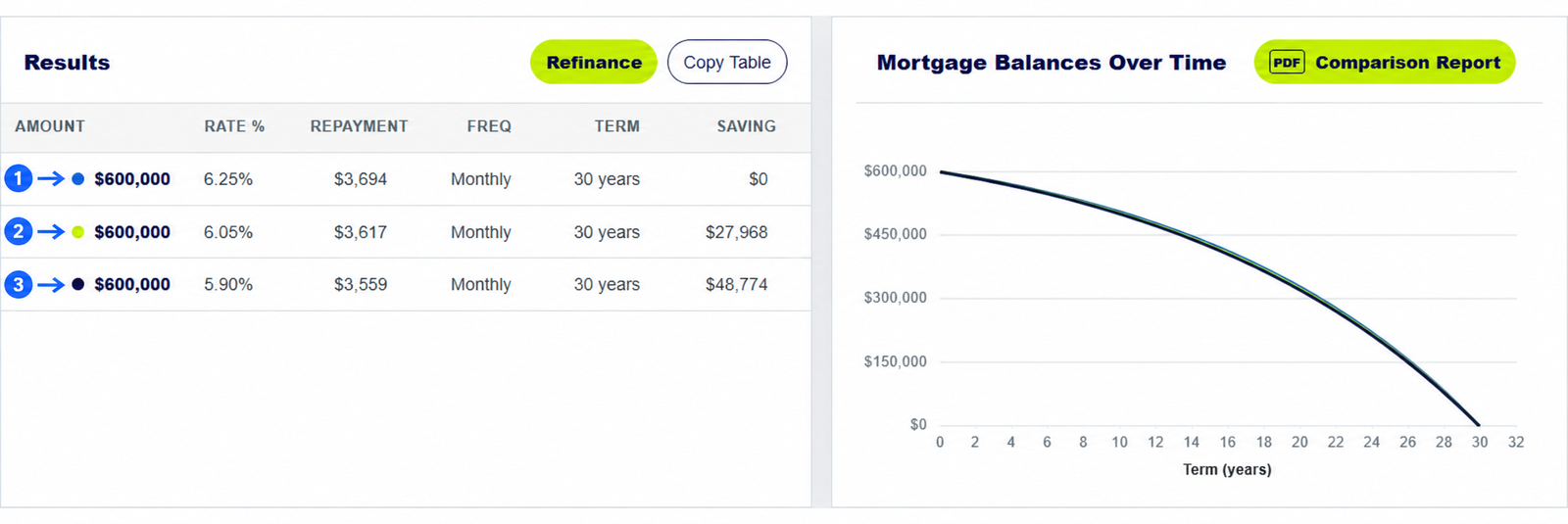
It does not provide live lender rates, product eligibility or a lender-issued Key Facts Sheet. Enter the rate and fees from the lender documents you are comparing, then verify any decision with the relevant lender or a qualified mortgage broker. If a term is unfamiliar, use the Australian mortgage and home loan glossary.
Compare mortgage repayments with your own figures
Start with one loan, duplicate it, and change the rate, fees, term, offset or repayment strategy in each scenario.
How did we compare mortgage repayment calculators?
We reviewed each public calculator page and its live calculator interface on 29 September 2026. We recorded only features visible in or directly linked from the repayment calculator. We also checked the published assumptions and limitations, including whether fees were excluded and whether a Key Facts Sheet was available. No lender supplied data or paid for inclusion.
This is a feature comparison, not a ranking of lenders, loan products, rates or customer service. Calculator outputs can differ because of compounding, daily interest, payment dates, rounding, fee timing and product rules. For a fair test, enter the same amount, term, rate, repayment type and frequency into each tool and compare the stated assumptions as well as the result.
What should you ask before using a mortgage repayment calculator?
What is the best mortgage repayment calculator in Australia?
The best fit depends on the question. MoneySmart is useful for an independent starting point, lender calculators are useful for their own product rates and documents, and a multi-scenario calculator is useful for comparing several strategies, fees and repayment changes together.
How accurate is a mortgage calculator when comparing home loans?
A mortgage calculator can produce a useful estimate when you enter consistent inputs, but it cannot replace lender documents. Check the comparison rate, fees, revert rates, offset rules, extra repayment limits and eligibility conditions before choosing a loan.
Which mortgage calculator provides a full repayment schedule?
LoanCalculator.Mortgage produces a full period-by-period repayment schedule for the selected scenario and provides a print option. Some lender tools provide repayment tables or graphs, but the level of detail varies.
How does a mortgage repayment calculator estimate monthly payments?
A mortgage repayment calculator uses the loan balance, interest rate, remaining term, repayment frequency and repayment type. Fees, introductory rates, offsets and extra repayments can change the total cost, so use the same assumptions when comparing calculators.
Can a home loan calculator estimate how long it will take to repay a loan?
Yes. The scheduled loan term provides the starting estimate. Regular extra repayments, lump sums and offset balances may shorten it, while rate increases or reduced repayments may extend it. The home loan calculator can model these changes using your figures.
Which mortgage calculator includes an offset account and extra payments?
LoanCalculator.Mortgage can model a starting offset balance, recurring extra repayments and a dated lump sum in the same scenario. NAB also provides offset and extra repayment modelling, while some other lenders split these tasks across separate tools.